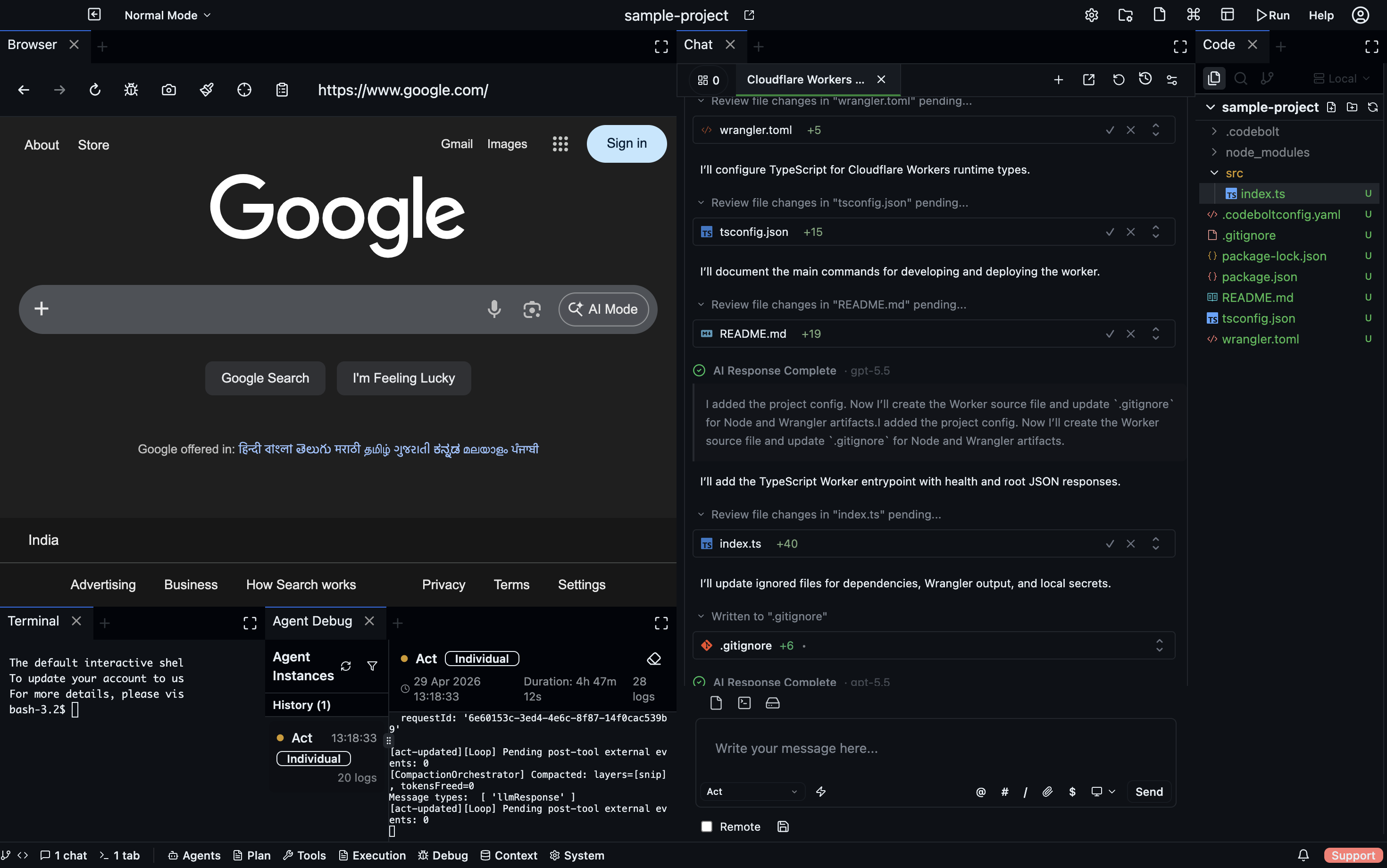
A complete AI code editor, orchestration console, and runtime surface for Codebolt-native applications. Open projects, edit code, run terminals, talk to agents, inspect their work, manage plans, and launch runtime panels from one workspace.
Codebolt Editor is the desktop command center for the engine. Open projects, edit code, run terminals, talk to agents, inspect their work, manage plans, coordinate environments, install plugins, and launch application interfaces that run directly on the Codebolt runtime.
The editor is not only chat next to files. It is a complete workspace where code, context, agents, planning artifacts, runtime panels, and observability live together.
Open workspaces with file tree, editor state, chat threads, project-local config, checkpoints, indexes, codemap, and memory. Tune the panel layout and settings profiles per project.
Code editing, terminals, file explorer, project context, chat, checkpoints and rollback, and model selection in one desktop surface.
Run agents from the project, including built-in agents, remixes, custom agents, third-party agents, and remote agents. Use agent portfolios and the thread panel to manage work.
Inspect agent logs, LLM calls, token budgets, and console output, plus narrative graphs and run history without leaving the workspace.
Roadmaps, specs, UI flows, requirement plans, action plans, and tasks live beside the code so humans and agents share the same source of truth.
Agents and plugins can open dynamic panels, stream data into them, and receive user actions back. Build a first panel, package plugin-backed panels, or create custom agentic apps.
Codebolt Editor sits on top of the same server runtime used by CLI, cloud, and headless deployments. The editor becomes the human-facing control plane for agent runs that may execute locally, in Docker, in cloud sandboxes, on remote servers, or across provider-backed environments. You can monitor the run, inspect artifacts, review changes, and keep coordination state in one place.
The editor is an application host. Plugins can add panels, commands, provider integrations, and backend behavior. Agents can open dynamic panels for reviews, dashboards, forms, status views, approvals, or domain-specific workflows. The UI is not fixed to a single sidebar or chat panel; it can change with the task.
The biggest shift is that Codebolt Editor is not only where you write applications. It is also where Codebolt-native applications can run. A plugin can act as the backend, a dynamic panel can act as the frontend, and the Codebolt engine provides agents, tools, memory, events, project state, and execution. This is closer to cloud-native applications than a normal extension model: the app is designed around the runtime, not just hosted beside it.
Codebolt Editor connects planning, implementation, agent management, evaluation, optimization, and delivery instead of scattering them across disconnected tools.
Capture product phases, features, specs, UI flows, and requirement plans as project files that agents can read before acting.
Learn more →Create structured action plans with tasks, dependencies, parallel groups, and progress that agents can update while they work.
Learn more →Manage standalone tasks, subtasks, statuses, and kanban columns alongside the codebase and agent message history.
Learn more →Run coding agents against the project context, inspect file edits, review checkpoints, and keep human control over the work.
Learn more →Use built-in agents, remixes, custom agents, remote agents, and specialized teams without leaving the editor surface.
Learn more →Define eval tasks, score outputs, compare runs, and run optimization loops that improve agents over iterations.
Learn more →Use debug panels, AI call inspection, console streams, and narrative graphs to see why an agent made each decision.
Learn more →Move from editor work to CLI, cloud, remote environments, or Codebolt-native application surfaces without changing the underlying engine.
Learn more →